
C Locker Pro8.3.6.8 - Google Play
You'll be able to see results in few seconds.
Publisher Description
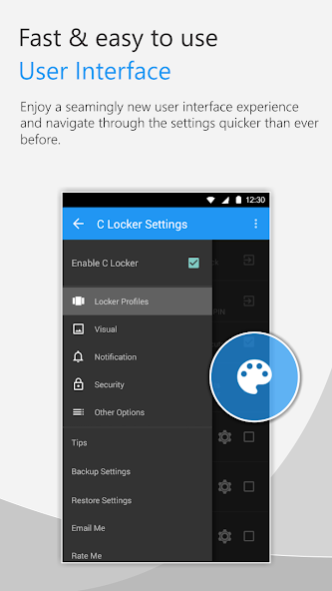
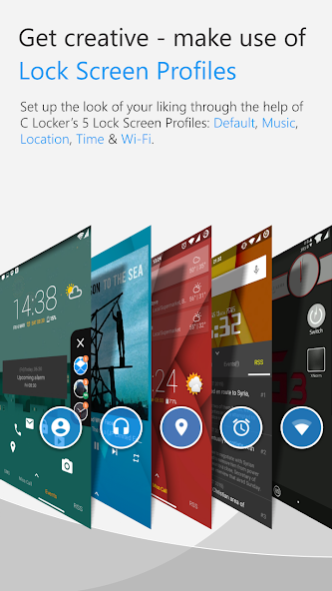
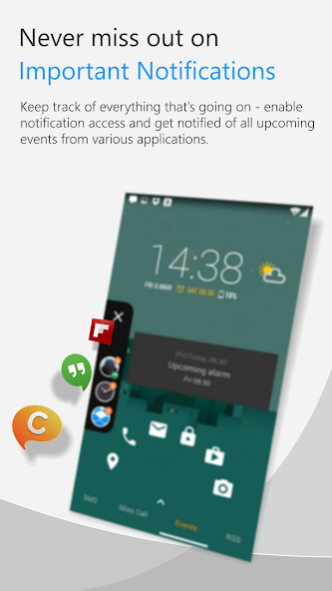
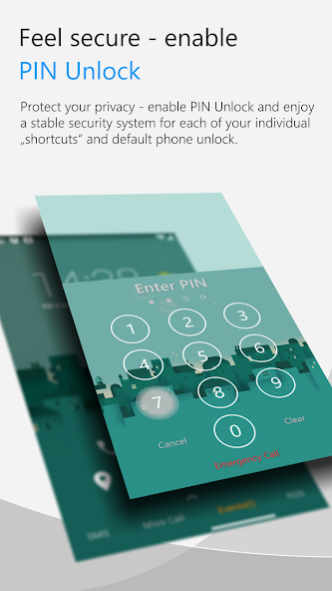
>>>Customize the Widgets you like, Launch the Actions you need…quickly!
Latest Update:
~~Pattern Unlock added
~~Security Selfie, auto taking selfie and email you when PIN/Pattern Attempts failed
~~C Locker now supports Samsung Galaxy S Series Fingerprint Unlock!!
Note:
~~Please try the FREE VERSION before buying, some of the features may not be compatible to your device:
https://play.google.com/store/apps/details?id=com.ccs.lockscreen
=====Extra Features for Pro version: =====
1. Things you can see from the Lock Screen:
---All resizable and moveable app Widgets, you can add as many as your device allows
---Lollipop, and Classic Side Icon notification styles
2. Things you can customize on the Lock Screen
---Adding Multiple app Widgets for 6 Profiles: default, music, location, time, wifi, bluetooth
---Locker screen sliding gesture actions with 4 directions (Up, Down, Left, Right) X 2 fingers
---Double/Triple Tap to turn off screen and other shortcut actions
---More than 30 custom shortcuts your can set to launch apps, direct call, direct sms
---Security PIN/Pattern for shortcuts and unlock with AutoSelfie if unlock PIN
=====Features for Free version: =====
1. Things you can see from the Lock Screen:
---6 Lock Screen Profiles: default, music, location, time, wifi, bluetooth
---All resizable and moveable app Widgets, you can add up to 2 widgets for each profile
---Lollipop, and Classic Side Icon notification styles
2. Things you can customize on the Lock Screen
---Preset your own location default, music, location, time, wifi, bluetooth
---5 Unlock Style: Simple Unlock, Gesture Unlock, Fingerprint Unlock(Samsung Galaxy Series only), Ring Unlock, Triangle Unlock..
---Security PIN/Pattern for shortcuts and unlock with AutoSelfie if unlock PIN (one PIN can be set for Free version)
---Volume Rocker Control, long press to play/skip (next/prev) music.
---Block statusbar, hide statusbar clock and icons, disable statusbar alerts, hide navigation bar (Root access required)
---Full Screen (hide the status bar...)
---Lock screen Wallpaper/Live Wallpaper
---Screen timeout
---Unlock sound, screen off sound
---And many other customizations
=====Android Permissions Information=====
-This app uses the Device Administrator permission
-This app uses Accessibility services
https://www.dropbox.com/s/aavmz9c7rv8nlhj/C%20Locker%20Permissions.pdf
About C Locker Pro
The company that develops C Locker Pro is astoncheah2. The latest version released by its developer is 8.3.6.8.
To install C Locker Pro on your Android device, just click the green Continue To App button above to start the installation process. The app is listed on our website since 2019-07-08 and was downloaded 0 times. We have already checked if the download link is safe, however for your own protection we recommend that you scan the downloaded app with your antivirus. Your antivirus may detect the C Locker Pro as malware as malware if the download link to com.ccs.lockscreen_pro is broken.
How to install C Locker Pro on your Android device:
- Click on the Continue To App button on our website. This will redirect you to Google Play.
- Once the C Locker Pro is shown in the Google Play listing of your Android device, you can start its download and installation. Tap on the Install button located below the search bar and to the right of the app icon.
- A pop-up window with the permissions required by C Locker Pro will be shown. Click on Accept to continue the process.
- C Locker Pro will be downloaded onto your device, displaying a progress. Once the download completes, the installation will start and you'll get a notification after the installation is finished.
Program Details
System requirements
Download information
Pricing
Version History
version 8.3.6.8
posted on 2019-07-09
fixed startup on android 9
version 8.3.4
posted on 2017-12-04
★★★Christmas & New Year Sales★★★
From Now to 31 Dec 2017, C Locker Pro(USD 2.99), C Notice Prime(USD 1.99) and C Floating Prime(USD 1.99) are all selling at USD 0.99!! Grab all as you can!!
version 8.1.4.3
posted on 2016-10-04
Change Logs:,8.1.4v,added: hide network carrier in PIN view,fixed: screen turns off too fast when receiving new sms,8.1.2v,added: hide 'forgot pin' option,added: press back key to unlock,added: device brand/model on auto-selfie email,added: Smart Unlock for Wifi, Bluetooth and Location profiles
Disclaimer
Official Google Play Link
We do not host C Locker Pro on our servers. We did not scan it for viruses, adware, spyware or other type of malware. This app is hosted by Google and passed their terms and conditions to be listed there. We recommend caution when installing it.
The Google Play link for C Locker Pro is provided to you by apps112.com without any warranties, representations or guarantees of any kind, so access it at your own risk.
If you have questions regarding this particular app contact the publisher directly. For questions about the functionalities of apps112.com contact us.
